
What Is the Statusline Customizer?
In Aki Dev Sync 1.31.0, monitoring has expanded from a single statusline into dashboards for Claude Code and Antigravity. Choose a 2/4/6/8-slot layout, control each monitor independently, and see parallel refreshes with a countdown to the next update. The history below still documents how the Statusline Customizer and standalone script evolved.
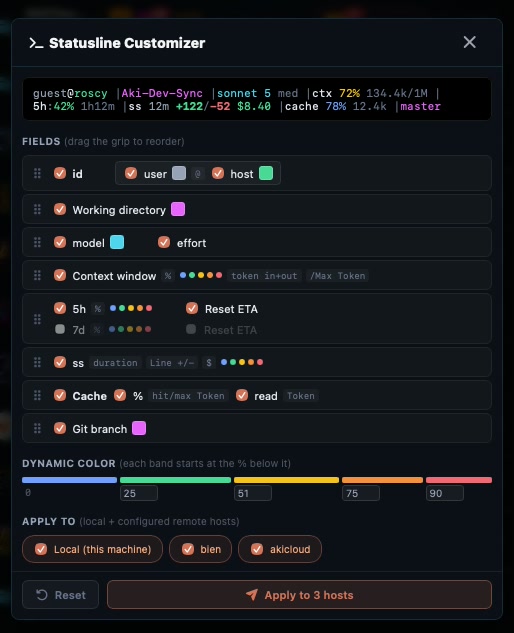
The Statusline Customizer is a tool inside Aki Dev Sync that visually builds the ~/.claude/statusline-command.sh file for the Claude Code CLI, the status line shown at the bottom of every terminal session. Instead of hand-editing bash and jq, you toggle fields on and off, drag to reorder them, and pick colors from swatches, with everything reflected in a live preview.
Which Fields Can Be Toggled?
- Identity (user@host): username and hostname, each independently colorable.
- Current working directory.
- Model and effort level: effort is split into its own toggle, locked to grey, so the model name can stand alone when effort isn't needed.
- Context window percentage, with input/output tokens and the /max value.
- 5-hour and 7-day rate limits, each window with its own sub-row showing the estimated time to reset.
- Session duration, lines changed, and session cost.
- Cache hit/read percentage.
- Current git branch.
Drag-and-Drop Reordering and Field Groups
Fields are reordered using native HTML5 drag-and-drop, with no extra dependency. Related fields are grouped: model+effort, 5-hour+7-day rate limits, cache%+tokens. A group moves as one unit, and individual members cannot be dragged out of their group.
In the actual generated statusline, fields within the same group render joined together with no | separator between them; the | character only appears between different blocks, keeping the line readable instead of fragmented into tiny pieces.
How Does the 5-Tier Dynamic Color Ladder Work?
Dynamic color splits into 5 tiers by urgency: blue below 25%, green 25-55%, yellow 55-75%, orange 75-88%, red at 88% and above. The bands narrow as urgency rises, since that's exactly where color needs to carry the most information.
In the UI, this shows as a proportional colored bar, with threshold inputs positioned directly under their own band, meaning the input's position is its meaning, no extra label text required to understand it. Session cost is colored by the same ladder, scaled against $30 as the full-red ceiling.
Color Swatches Instead of Text Dropdowns
Each field used to pick its color from a text <select> dropdown, which took up a fair amount of horizontal width. Now each field has a small 14x14px color block; clicking it opens an 8-swatch palette for a quick pick, same information.
Applies to Multiple Machines at Once
A statusline configuration applies to the local machine and/or any number of configured SSH remote hosts at once (multi-host push). Edit once, update the statusline everywhere, no need to log into each machine separately to adjust it.
The Default Color Doctrine
The default palette follows a clear doctrine: white for labels and punctuation, cyan for ordinary information, yellow/magenta to mark "which machine am I on" (a standout the eye can find quickly across multiple open terminals), grey for secondary detail, and dynamic color for anything that must be noticed immediately.
Use the Script Standalone, No App Install Needed
The core of this feature, the script that generates the statusline, also ships standalone at share/aki-statusLine/statusline.sh in the repo, no need to install the full Aki Dev Sync app to use it. Just copy the file to ~/.claude/statusline-command.sh, add a statusLine entry in ~/.claude/settings.json, and have jq installed on your machine.
Regression-Tested
The script generator is regression-tested with three layers: a bash -n syntax check on the full script, join-expression assertions for each field group, and an end-to-end run against a realistic Claude Code payload. That means an edit to the script generator can't silently produce broken bash.
What's New in v1.26.0: Claude Code and Antigravity CLI Unified
Before v1.26.0, the Statusline Customizer had a quiet gap: its own tooltip claimed the file would be written for both Claude Code and the Antigravity CLI (AGY), but the checkboxes actually defaulted to AGY-only, so plenty of users assumed ~/.claude/statusline-command.sh had been written when it never was. v1.26.0 fixes this at the root: both the Claude Code and AGY targets are now ticked by default, and the tooltip lists the exact file paths that will be overwritten before you confirm.
The second big change is in how the script itself is generated. Previously, Claude Code and the Antigravity CLI each received a separately generated script, and these two "dialects" could drift apart over time if one got patched and the other didn't. As of v1.26.0, both CLIs share one byte-identical script, which self-detects which CLI is running it and behaves accordingly, eliminating the drift risk entirely.
Finally, this release also fixes a bug that had persisted since v1.10.0: a "phantom quota" issue where a stale reading, left over from a different account's session, could get stuck on the statusline indefinitely and never refresh, showing incorrect numbers until the app was restarted. That bug is now fully resolved.
See Also
Read the full app overview in What Is Aki Dev Sync, or browse the source on GitHub.