Aki Dev Sync
A macOS development command center built with Vue and Tauri: Local is the Source of Truth and Remote is the AI Workspace. PUSH code for AI work, PULL results back for review and commit, with DRY RUN, automatic sync status, terminals, Git tools, and paired-phone control.
Local Is the Source of Truth
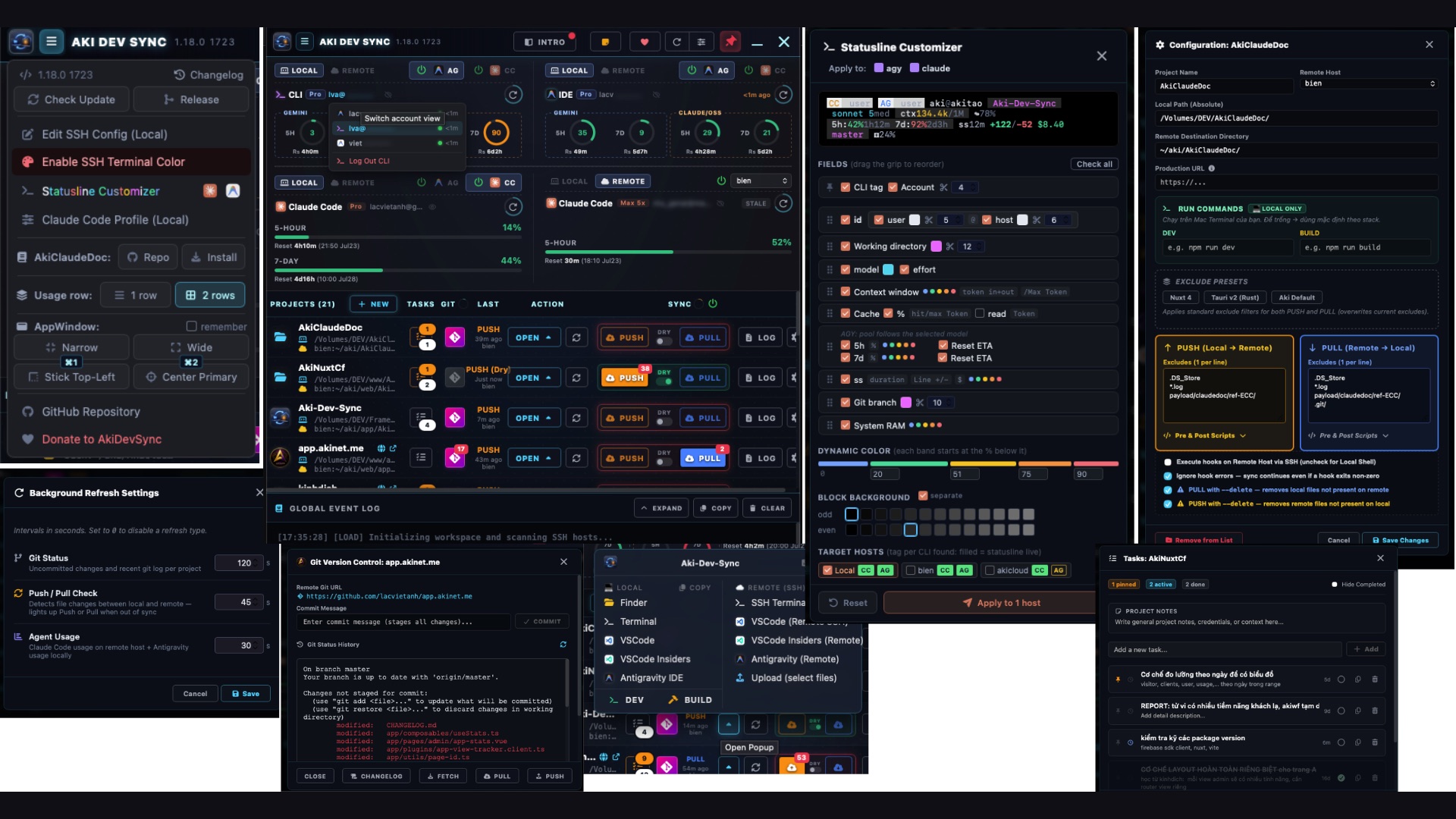
PUSH Local → Remote for AI work, then PULL Remote → Local for review and commit. SELECT syncs multiple files using modification-time comparison; DRY RUN previews changes and automatic indicators show where each project differs.
Safe, Stoppable Sync
Mirror/Delete is off by default, and operations that may overwrite newer work require confirmation. Running syncs can be stopped, with directional excludes/presets and local or remote pre/post hooks.
One Place for Every Project
Each project has its own tasks and notes alongside a shared Global Note. The Git modal shows repository state and changelog previews, SSH config is editable, and DEV/BUILD actions are detected from the stack.
Integrated Terminals
Open per-project or global terminal groups inside the app. Terminal tabs support wheel scrolling and active-tab reveal, while project state uses a project-level power icon instead of a slider.
Claude Code and Antigravity Monitoring
Monitor Claude Code and Antigravity in configurable 2/4/6/8-slot layouts, with independent power state per monitor. Refresh runs in parallel and shows a countdown to the next update.
Paired-Phone Control
A paired phone can control projects, use a real terminal, and receive the same safety confirmations as the desktop. The connection goes directly to your machine without an author-operated intermediary server.
How It Works & Built-In Toolkit
Local as source of truth, Remote as the AI workspace
The local control of your git history remains strictly on your local machine, where you conduct rigorous reviews and commit. Conversely, the SSH remote machine acts as the "industrial workshop", where AI agents (Claude Code, Claude MAX) directly ingest the massive project context and generate substantial code changes. The PUSH button thrusts all modifications (including .git/ so the AI absorbs codebase history) up to the remote. The PULL button sweeps up everything the AI tirelessly produced, bringing it back locally for your audit prior to commit, finalizing a flawless closed-loop lifecycle.
Engineering Prowess & Project management
- Unit-of-Work Controller: A supreme monolithic background architecture that funnels all data stream refresh requests (whether from background cycles, manual clicks, or config saves) into a singular function, using generation tokens to annihilate process overlapping, guaranteeing accurate loading states.
- Zero-JS Textarea: Project notes and Global Notes use
field-sizing: contentto grow with their content without custom JavaScript resize logic. - Smart Open Popup: Not just simple shortcuts, but a true analyzer engine that recursively scans lockfiles (Nuxt/Node/Tauri) to interpolate and dynamically generate 1-click DEV/BUILD commands, firing them straight into your local Terminal or through SSH tunnels.
- Regex ANSI Git panel: Discarding bland outputs, a heavy-duty client-side Regex parser intercepts raw terminal color codes (decoding escape sequences) to render Git logs in pristine original colors, while supporting Unicode via forced
core.quotepath=falseconfiguration. - SSH Config Editor & Hooks: An SSH config editor embedded with a safety net mechanism that auto-generates backups before saving. Accompanied by a shell scripting architecture that clamps Pre/Post Hooks around both ends of the rsync lifecycle, unlocking potential for auto-triggering Docker containers.
Pin workspace: one macOS Desktop per project
Hard-pin the Tauri window piercing through all macOS Desktops/Spaces (workspaces). By equipping work-area-aware size restructuring presets (like ultra-slim Narrow, corner-locked Stick Top-Left, or Center Primary), the app transforms into an immovable command center. This allows you to swipe rapidly back and forth across dozens of large and small projects while perpetually controlling the sync status and AI quota of every single project in the exact same familiar screen spot. These layout presets can now be bound to F1/F2/F3 shortcuts and persist across launches, restoring your chosen position and size automatically instead of making you pick a preset again every time the app starts. F12 toggles the pin directly, and F1 now snaps to whichever monitor the app is currently on instead of always the topmost-leftmost one. Read the full spatial macOS workflow.
No intermediary server
Your entire dataset is inviolable. Aki Dev Sync executes secure data synchronization exclusively through native rsync and ssh encrypted tunnels connecting directly to SSH server clusters over which you hold direct control. There is zero code secretly beaming your source files or quota metrics through any intermediary proxy servers owned by the author or third-party services.
Frequently Asked Questions
What problem does Aki Dev Sync solve?
It keeps code in sync between a local machine (where you review/commit) and a remote machine (where you run builds or AI agents), without creating junk commits just to move files between the two.
Is Aki Dev Sync free and source-available?
The source code is public at github.com/lacvietanh/aki-dev-sync. Since the license terms can change over time, check the current license directly on the GitHub page before relying on it for commercial use.
What platforms does Aki Dev Sync support?
macOS only, with a Universal build that runs on both Apple Silicon and Intel chips. There is no Windows or Linux version.
Does the remote machine need to run Claude Code specifically?
Not for the file-sync part; PUSH/PULL work independently of whatever AI agent is running. The quota-monitoring feature currently has deep support for Claude Code and Antigravity specifically; other agents can still use the remote machine over SSH but will not get a dedicated quota panel.
Is my code sent through a third-party server?
No. Aki Dev Sync syncs directly via rsync and ssh to an SSH host you configure yourself, with no intermediary server owned by the author or any third party.
Do I need to install extra software to run it?
Just rsync and ssh, both already available on macOS, plus an SSH host your machine can reach.
What is a Claude Code statusline?
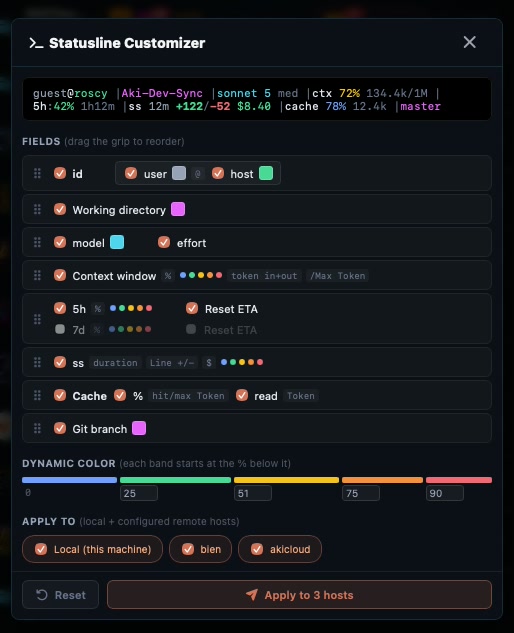
It is the status line shown at the bottom of a Claude Code CLI session, typically showing the current directory, active model, remaining context window percentage, and other operational details, generated by a bash script the user configures.
Do I need the full Aki Dev Sync app to use just the statusline script?
No. The statusline script ships standalone at share/aki-statusLine/statusline.sh in the repo. Copy it to ~/.claude/statusline-command.sh and reference it in ~/.claude/settings.json, no app install required.
What does the 5-tier color ladder mean?
It is 5 color tiers by urgency of a percentage value: blue below 25%, green 25-55%, yellow 55-75%, orange 75-88%, red at 88% and above, with bands narrowing as urgency increases.
Can I push the statusline config to a remote server too?
Yes. The Statusline Customizer supports applying a configuration to the local machine and/or any number of configured SSH remote hosts at once, so one edit updates it everywhere.
What is a macOS Space or Desktop?
A separate virtual workspace on the same physical screen, each Space can hold a different set of app windows, switched between with a three/four-finger swipe (Ctrl+swipe) or Control plus left/right arrow, letting you separate work contexts without needing multiple physical monitors.
Does pinning the window across Spaces affect performance?
Pinning uses macOS window options for always-on-top and visibility across workspaces; actual resource use still depends on the app state and work it is doing.
Does this require any setup beyond the window-size presets?
No. Just toggle the pin (thumbtack) button on the titlebar and pick one of the window-size presets from the app-icon menu (☰); no extra macOS configuration or project setup is needed.
Related articles
What Is Aki Dev Sync? A macOS App to Sync Split Dev Environments
Aki Dev Sync is a macOS tool by Lac Viet Anh that keeps a split development environment in sync, allowing you to code on both sides without polluting git.
Statusline Customizer in Aki Dev Sync: Build a Claude Code Status Line
Toggle fields, drag to reorder, pick colors from swatches: the Statusline Customizer turns editing a Claude Code statusline into drag-and-drop.
Multiple Projects Across macOS Desktops With Aki Dev Sync
A real workflow tip: pin Aki Dev Sync in a fixed screen corner across every Desktop, so you never lose track of which project needs a push or pull.